Have you ever been told, “Please share a PPT by evening,” and suddenly your heart skipped a beat? You know what comes next—opening a blank slide, thinking about the title, choosing colours, fixing alignment, and somehow losing two hours just adjusting text boxes. Now imagine typing just a few lines about your topic and watching a complete presentation appear in front of you. Sounds unreal? That’s exactly what AI-enabled presentation tools are doing today.
Introduction: What If Your Presentation Could Make Itself?
Artificial Intelligence is no longer limited to chatbots or photo editing. It has quietly entered our daily work life, especially presentations. From students and teachers to office staff and entrepreneurs, many people are now using AI tools to save time and still look professional. These tools don’t just design slides; they think with you, suggest content, improve structure, and even make your slides look polished.

Let’s explore the top 5 AI-enabled apps and websites that can help you create PowerPoint presentations with ease—even if design is not your strong point.
Canva AI – When AI Meets Simple Design
Canva has already become a household name, and with AI features added, it has become even more powerful. Canva’s AI tool, often called Magic Design, allows you to type a topic or short description, and it creates a full presentation layout for you.

What makes Canva AI special is how beginner-friendly it feels. A college student preparing a seminar or a government employee making an official PPT can use it without any training. The AI suggests slide titles, text flow, images, and colours. You can edit everything easily, just like working on a simple document.

Many people now use Canva AI when they need quick results. For example, teachers preparing online classes or YouTubers pitching brand ideas often rely on it. Once done, you can download the file as a PowerPoint and present it anywhere.
Microsoft PowerPoint with Copilot – Smart Help Inside a Classic Tool
Most of us already know Microsoft PowerPoint, but now it comes with AI support through Copilot. This AI feature works directly inside PowerPoint and helps you create slides from a document, notes, or even a simple idea.
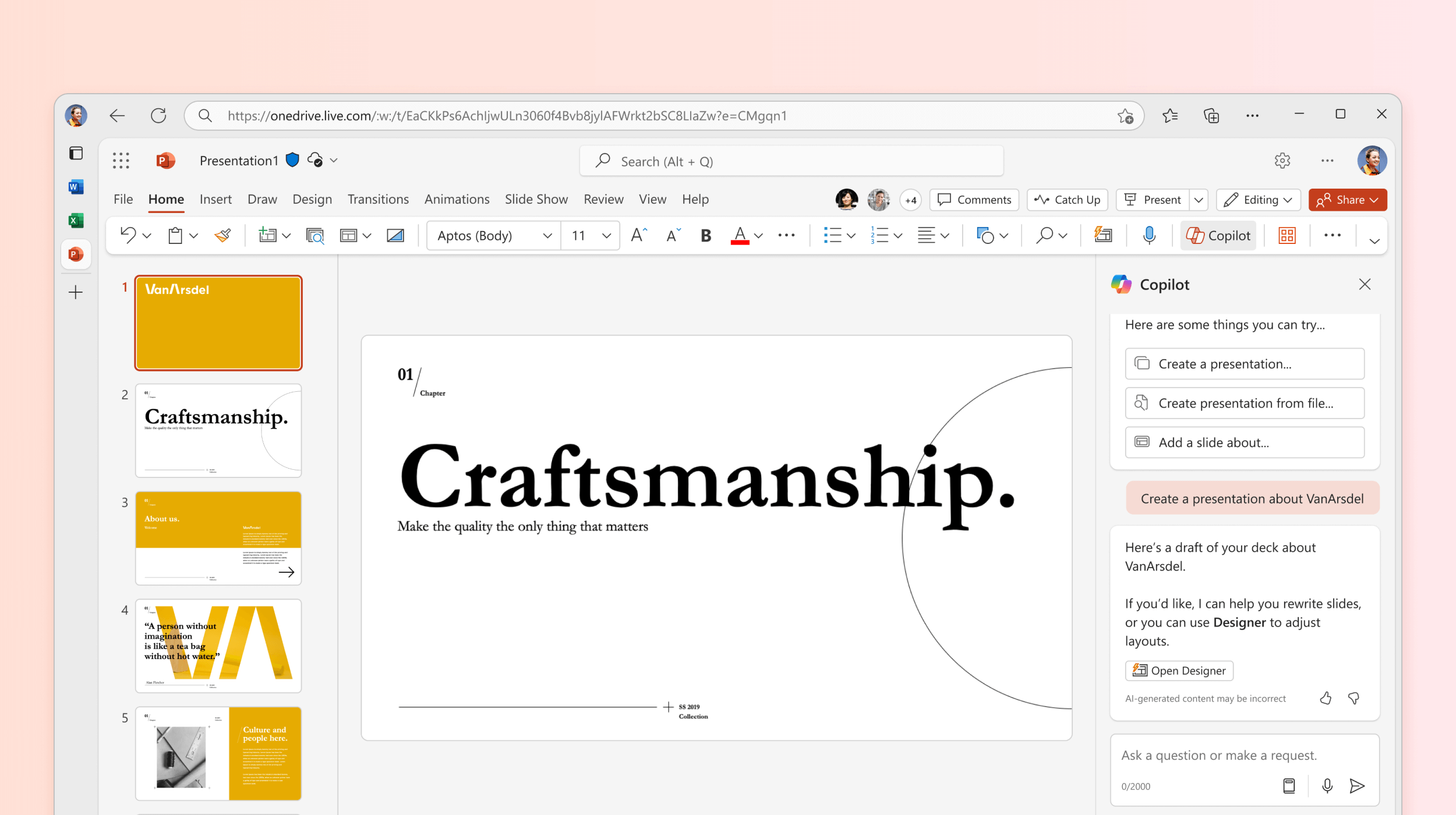
Imagine you have a Word file or meeting notes. Copilot can turn that content into a structured presentation within minutes. It also improves slide design, suggests better wording, and keeps the tone professional.

This is especially useful in offices and official environments where PowerPoint is still the standard. Instead of starting from scratch, AI helps speed up the work while keeping the formal style intact. For people who already trust PowerPoint, Copilot feels like a smart assistant sitting quietly beside you.
Google Slides with AI – Easy, Free, and Team-Friendly
Google Slides has always been known for simplicity and teamwork. With AI features slowly being added, it is becoming smarter at understanding content and suggesting improvements.

Google Slides can now help rewrite text, improve clarity, and suggest layouts based on your content. Since it works online, multiple people can work on the same presentation at the same time. This is very useful for students working on group projects or teams preparing presentations for online meetings.

A common real-life example is remote work. Teams sitting in different cities can build one presentation together without sharing files again and again. AI quietly supports the process by making content cleaner and more readable.
Beautiful.ai – Let AI Handle the Design Thinking
If you often struggle with slide alignment or spacing, Beautiful.ai might feel like a blessing. This tool is built around AI-driven design. You add content, and the AI automatically adjusts the layout to keep everything neat and balanced.

Beautiful.ai is popular among business professionals and startup founders who want clean and modern presentations without spending time on design details. The slides adjust themselves when you add more text or visuals, which saves a lot of effort.

For example, when preparing a project proposal or a business report, you can focus on ideas while the tool takes care of how the slides look. It’s like having a designer who never gets tired.
Tome AI – Turn Ideas into a Story-Style Presentation
Tome takes a slightly different approach. Instead of just creating slides, it helps you tell a story. You enter a topic or idea, and Tome’s AI creates a narrative-style presentation with text, visuals, and flow.

This tool is especially useful for creative presentations, product ideas, and concept explanations. Many creators and entrepreneurs use Tome to pitch ideas in a more engaging way. The slides feel less rigid and more like a guided story.

In a time when attention spans are short, storytelling matters. Tome helps people explain ideas in a way that feels natural and interesting, not robotic or boring.
Why AI Presentation Tools Are Becoming So Popular
The main reason people love AI presentation tools is simple–they save time. What earlier took hours can now be done in minutes. Another reason is confidence. Even if someone is not good at design or writing, AI helps improve the final output.
After online meetings and digital work increased in recent years, presentations became part of everyday life. AI tools stepped in at the right time to reduce pressure and improve quality. From classrooms to boardrooms, they are slowly becoming the new normal.
Conclusion:
AI-enabled presentation tools are not here to replace human thinking. They are here to support it. They help you start faster, work smarter, and present better. Whether you are a student, teacher, office employee, or content creator, these tools can make your work easier and less stressful.
The best part is that most of them are easy to use and require no technical skills. You just need an idea—and AI helps turn it into a presentation. So next time you hear, “Please make a PPT,” you might actually smile instead of worrying.
Disclaimer: It is for information and knowledge only